
Dette er en ældre version. Den nyeste version er 1.9.2. VideoKidnapper 1.9.2 · Udgivet:
Installationsfiler 1.9.0
| Arkitektur | Type | Omfang | Filstørrelse | Download | SHA256 |
|---|---|---|---|---|---|
| 64-bit | EXE (Inno Setup) · en-US | Aktuel bruger | — | github.com | VirusTotal |
| 64-bit | EXE (Inno Setup) · en-US | Alle brugere | — | github.com | VirusTotal |
Link og SHA256 stammer fra fællesskabets manifest i Windows Package Manager. Sammenlign hashen for den downloadede fil, før du kører den.
Udgivelsesnoter
Published to PyPI:https://pypi.org/project/videokidnapper/1.9.0/
**macOS:** `*-macos-arm64.dmg` (Apple Silicon) · `*-macos-x86_64.dmg` (Intel). Signed and notarized by Apple; FFmpeg bundled.
---
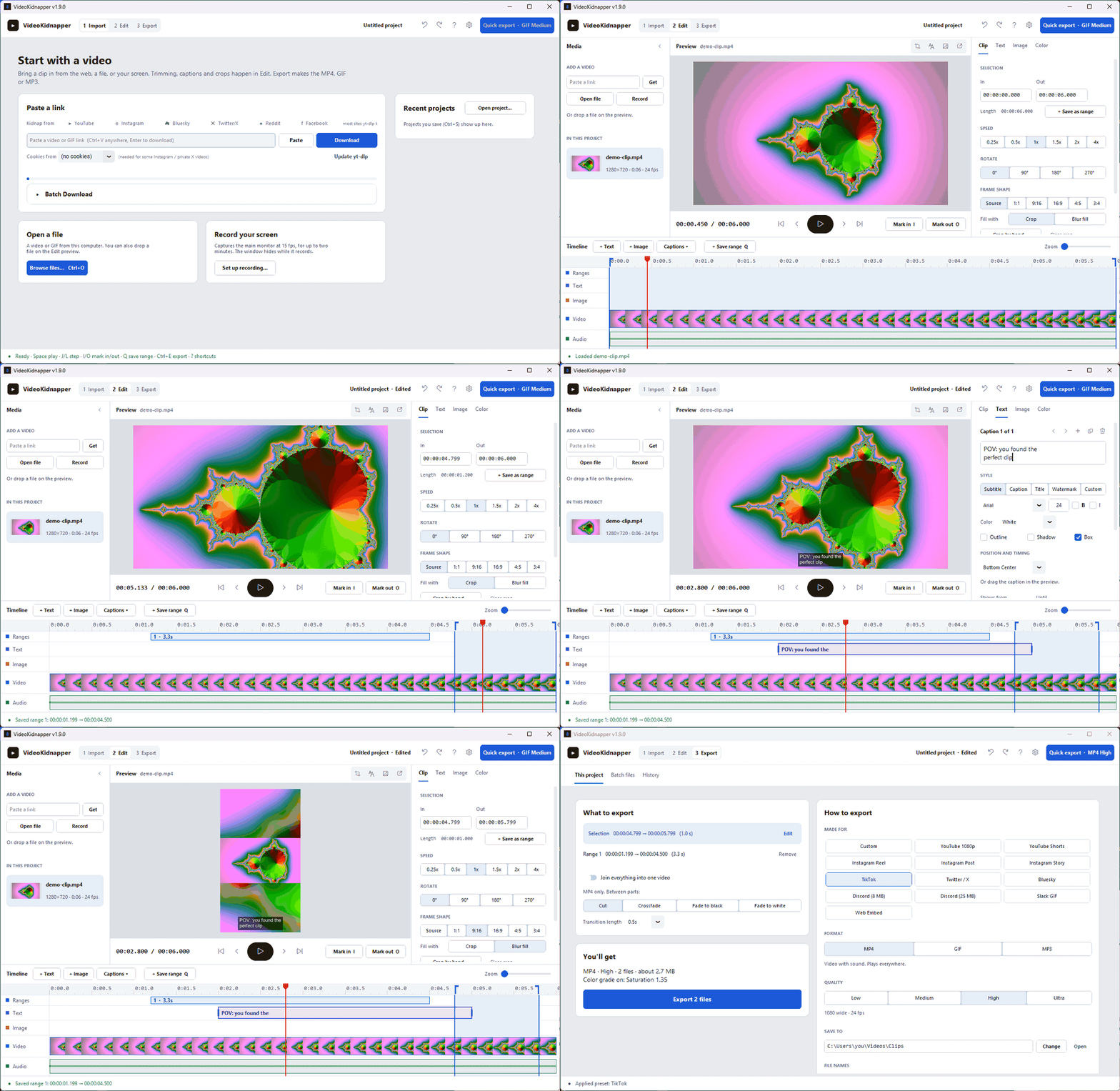
> **A new layout:Import, Edit, Export.** The editor fits on one screen with no scrolling, every export setting lives on one page, and a light Studio look replaces the old default.
### Added
• **Studio layout.** The app is organized as three steps across the top:Import, Edit and Export. Edit fits on one screen with no scrolling: media on the left, the preview with transport controls in the middle, an Inspector on the right (Clip, Text, Image and Color tabs that edit one selected thing at a time), and a track timeline underneath.
• **Track timeline.** Ruler, saved ranges, caption clips, image-overlay clips, a filmstrip and the waveform share one playhead. Click to seek, drag the in/out edges, drag a caption or overlay to move it, drag its edge to retime it, Ctrl+wheel to zoom.
• **Color in the preview.** The preview applies brightness, contrast, saturation and gamma the same way the export does, so a forgotten slider can no longer fade an export with nothing on screen to show it.
• **Q saves the selection as a range.**
• **Batch files, redesigned.** A queue table with per-row platform, plain-English status and a progress bar, plus a side panel for quality, MP4 or MP3, and the save folder. Speed, rotate, frame shape and color come from Edit instead of a second copy of the options, and finished files are added to History.
• **History with thumbnails.** Exports are grouped under Today, Yesterday and Earlier, each with a thumbnail, and missing files are greyed out.
• **Collapsible media panel.** Fold it to a thin rail (open, link and record stay one click away) for a bigger preview; the choice is remembered.
### Changed
• **Studio is the new default theme.** A neutral light look where the video is the most colorful thing on screen. Installs still on an earlier default (Dark, or Cream since 1.8.2) move to it once; Fallout, Retro and Light choices are kept. Dark is now Graphite, a neutral grey instead of navy. Every theme is under **Settings → Theme**, and all five carry the new timeline track colors.
• **Export settings live in the Export workspace.** Format, quality, platform presets, the save folder, file names, joining ranges and GIF options are on one page instead of a collapsed panel. Saved ranges can be reordered and removed there, and the file-name picker shows an example built from the loaded video's title. Batch files and History moved there too, and the debug log moved to the settings menu.
• **J and L move the playhead.** They used to move the in point. I and O now mark the in and out points at the playhead.
• **Setup and winget installs update from the GitHub release.** The update prompt opens the release, whose installer updates the app in place and keeps your settings, instead of running winget. Microsoft Store installs keep updating through the Store.https://github.com/AES256Afro/VideoKidnapper/releases/tag/v1.9.0


