Aquí hi ha 7 versions de VideoKidnapper, des de 10 de juliol del 2026 fins a l’actual, 1.9.1. Cadascuna enllaça amb els instal·ladors del mateix desenvolupador.
| Versió | Data | Mida | Fitxers |
|---|---|---|---|
| 1.9.1Darrera versió | 8 d’octubre del 2026 | — | 64 bits EXE (Inno Setup)64 bits EXE (Inno Setup) Notes de la versió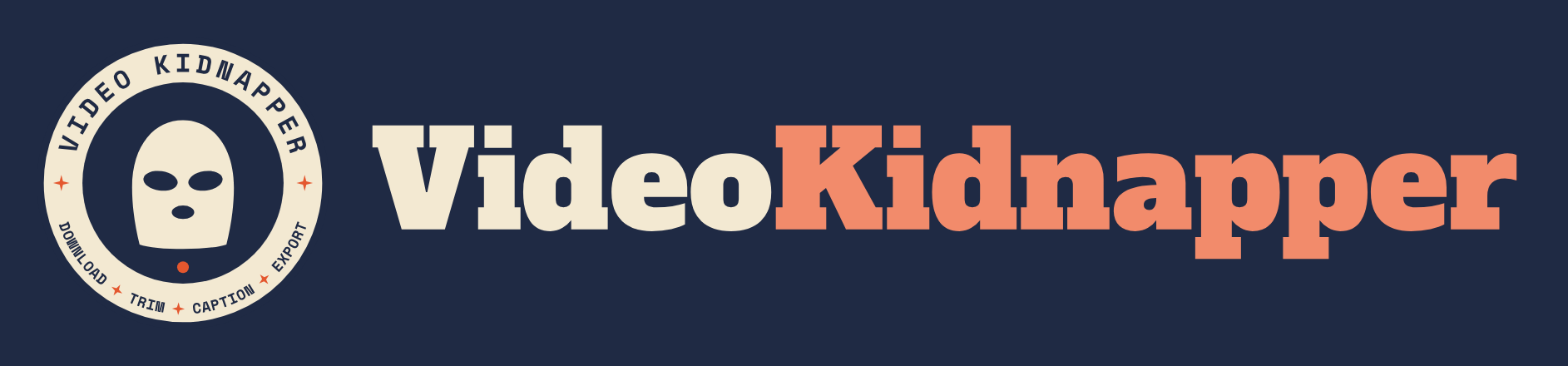
Published to PyPI:https://pypi.org/project/videokidnapper/1.9.1/
**macOS:** `*-macos-arm64.dmg` (Apple Silicon) · `*-macos-x86_64.dmg` (Intel). Signed and notarized by Apple; FFmpeg bundled.
---
> **A new logo**, and the play controls no longer cover the time readout on smaller windows.
### Changed
• **New logo.** A retro stamp:the balaclava on a navy disc inside a cream badge, with "VIDEO KIDNAPPER" across the top and the app's steps, download, trim, caption and export, along the bottom. It replaces the blue balaclava everywhere: the window and taskbar icon, the app header, the Store tiles, the macOS and Linux icons, the website and the README. Small sizes such as the taskbar use a ring-free version of the mark, so it stays crisp at 16 pixels. Every logo file is now generated by `scripts/make_brand_assets.py`.
### Fixed
• **The play controls covered the timecode on smaller windows.** Below about 1400 pixels wide, the transport under the preview drew the play buttons on top of the time readout, cutting the duration off. The controls now move into the free space and the readout drops its hours when the panel is narrow, so both stay visible down to the minimum window size. Times also round to the nearest millisecond instead of showing 1.2 s as 01.199. |
| 1.9.0 | 7 d’octubre del 2026 | — | 64 bits EXE (Inno Setup)64 bits EXE (Inno Setup) Notes de la versió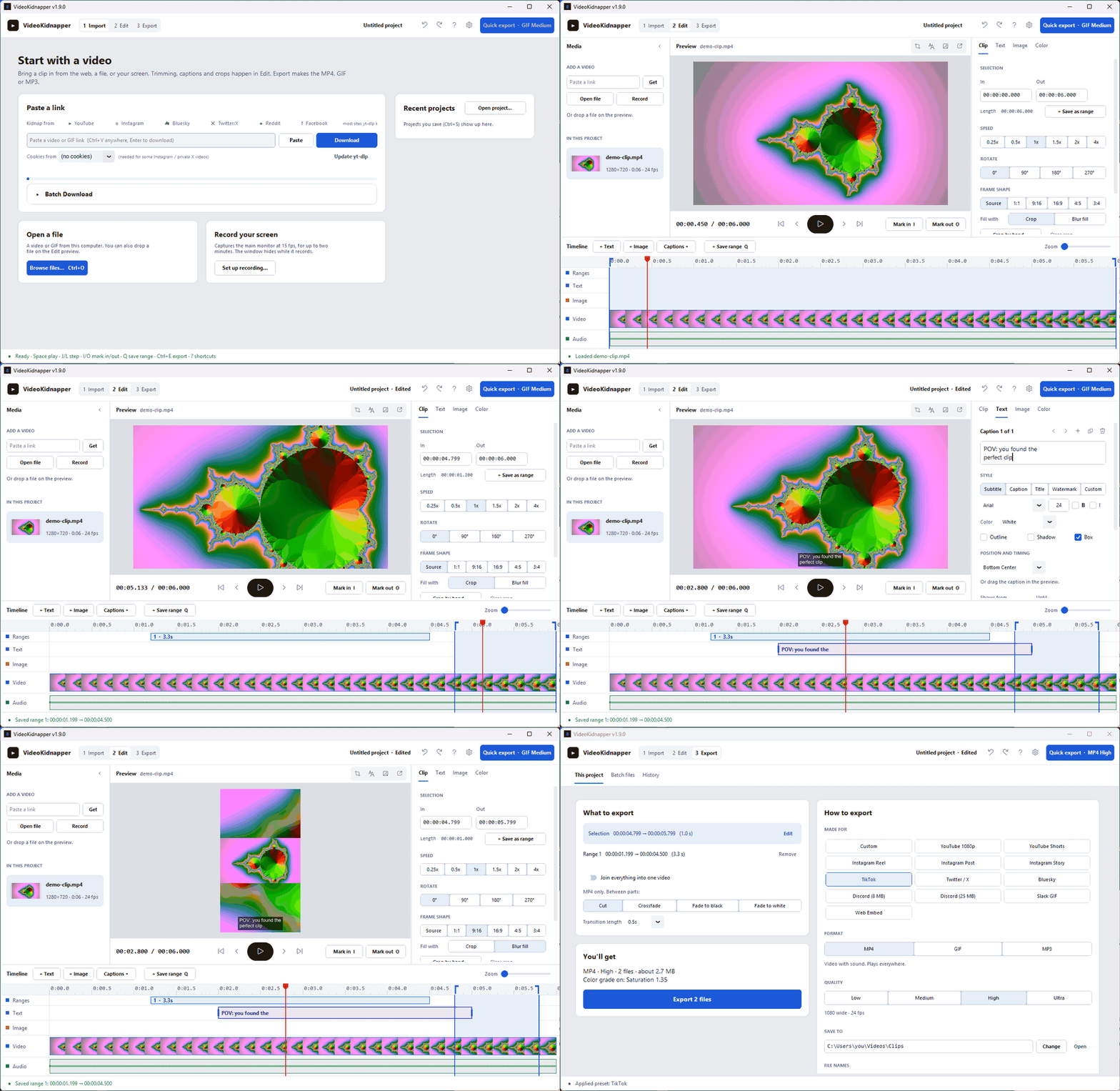
Published to PyPI:https://pypi.org/project/videokidnapper/1.9.0/
**macOS:** `*-macos-arm64.dmg` (Apple Silicon) · `*-macos-x86_64.dmg` (Intel). Signed and notarized by Apple; FFmpeg bundled.
---
> **A new layout:Import, Edit, Export.** The editor fits on one screen with no scrolling, every export setting lives on one page, and a light Studio look replaces the old default.
### Added
• **Studio layout.** The app is organized as three steps across the top:Import, Edit and Export. Edit fits on one screen with no scrolling: media on the left, the preview with transport controls in the middle, an Inspector on the right (Clip, Text, Image and Color tabs that edit one selected thing at a time), and a track timeline underneath.
• **Track timeline.** Ruler, saved ranges, caption clips, image-overlay clips, a filmstrip and the waveform share one playhead. Click to seek, drag the in/out edges, drag a caption or overlay to move it, drag its edge to retime it, Ctrl+wheel to zoom.
• **Color in the preview.** The preview applies brightness, contrast, saturation and gamma the same way the export does, so a forgotten slider can no longer fade an export with nothing on screen to show it.
• **Q saves the selection as a range.**
• **Batch files, redesigned.** A queue table with per-row platform, plain-English status and a progress bar, plus a side panel for quality, MP4 or MP3, and the save folder. Speed, rotate, frame shape and color come from Edit instead of a second copy of the options, and finished files are added to History.
• **History with thumbnails.** Exports are grouped under Today, Yesterday and Earlier, each with a thumbnail, and missing files are greyed out.
• **Collapsible media panel.** Fold it to a thin rail (open, link and record stay one click away) for a bigger preview; the choice is remembered.
### Changed
• **Studio is the new default theme.** A neutral light look where the video is the most colorful thing on screen. Installs still on an earlier default (Dark, or Cream since 1.8.2) move to it once; Fallout, Retro and Light choices are kept. Dark is now Graphite, a neutral grey instead of navy. Every theme is under **Settings → Theme**, and all five carry the new timeline track colors.
• **Export settings live in the Export workspace.** Format, quality, platform presets, the save folder, file names, joining ranges and GIF options are on one page instead of a collapsed panel. Saved ranges can be reordered and removed there, and the file-name picker shows an example built from the loaded video's title. Batch files and History moved there too, and the debug log moved to the settings menu.
• **J and L move the playhead.** They used to move the in point. I and O now mark the in and out points at the playhead.
• **Setup and winget installs update from the GitHub release.** The update prompt opens the release, whose installer updates the app in place and keeps your settings, instead of running winget. Microsoft Store installs keep updating through the Store. |
| 1.8.4 | 22 de setembre del 2026 | — | 64 bits EXE (Inno Setup)64 bits EXE (Inno Setup) Notes de la versióPublished to PyPI:https://pypi.org/project/videokidnapper/1.8.4/
**macOS:** `*-macos-arm64.dmg` (Apple Silicon) · `*-macos-x86_64.dmg` (Intel). Signed and notarized by Apple; FFmpeg bundled.
---
> **Exports now look like the video you started with, and like the preview.** Phone footage no longer comes out darker and faded, and captions and stickers land where you placed them.
### Added
• **Captions always stay on screen.** A caption wider than the exported frame now wraps onto more lines instead of running off both edges. One still too tall for the frame, from many lines or a big font on a small frame, steps its font size down until it fits. No position can push a caption off either:one dragged past an edge, or a motion path that leaves the frame, stops at the edge with its outline intact. All of this follows the export's real frame, so switching to a 9:16 preset re-fits automatically, and the preview lands on the same pixels as the export. The text you typed is never changed, and wrapping can be switched off per caption.
### Fixed
• **Phone video exported darker and faded.** iPhones and many Android phones record HDR, and nothing converted it to normal video, so exports came out about 26 levels darker with a third of the colour. MP4s also stayed 10-bit HDR, which many phones, browsers and chat apps can't play. HDR is now tone-mapped to standard colour on the way in, and every MP4 is written as 8-bit BT.709 with its colour tagged, so every player shows it the same way. The tags are set on the frames as well as the file, because ffmpeg 7 and later ignore file-level tags that the frames contradict. If an ffmpeg build rejects the HDR conversion, the export still completes with a plain conversion rather than failing. Measured on HDR test footage, exports now match the SDR original within compression noise. The preview uses the same conversion, so it shows the colours you will get.
• **Captions were cut off in vertical and cropped exports.** The preview placed captions on the full frame, but the export drew them after the aspect preset, crop, blur fill or rotation had reshaped it. A centred caption that fit the 16:9 preview was sliced off at both edges of a 9:16 export, and dragged captions landed offset by the crop. The preview now shows the exported frame, dims whatever an aspect preset cuts away, and places, sizes and wraps captions exactly as the export does.
• **Stickers came out much larger than in the preview.** Stickers were added after the export was scaled down, so a sticker that covered a fifth of the preview covered four fifths of a Low-quality export. They are now added before the downscale.
• **Multi-line captions sat lower in the preview than in the export.** The preview spaced lines differently from ffmpeg, by up to 30 pixels on a four-line caption. ffmpeg itself changed its line spacing in version 6.1, so the preview now detects which spacing the installed ffmpeg uses and copies it. Checked against ffmpeg 6.0, 6.1 and the current development build.
• **Animated PNG stickers could hang the export forever.** On current ffmpeg, which the Windows installer and the Linux AppImage ship, looping an animated PNG made ffmpeg spin without finishing. Animated PNGs now loop through ffmpeg's own PNG reader, which works on every version tested. An animated PNG saved to play a set number of times now plays that many times instead of forever.
• **An aspect preset plus a 90° rotation stretched the picture.** The preset was applied before rotating, so a 9:16 preset on rotated landscape video produced a sideways strip stretched about three times too tall. The preset now applies to the rotated picture.
• **Smaller colour shifts.** GIFs from untagged HD video and sticker images were converted with the colour matrix meant for standard-definition video, shifting every hue slightly. Full-range video is now converted to the standard range that all players expect.
• **Ultra quality now means maximum quality.** With the encoder on Aut |
| 1.8.3 | 8 de setembre del 2026 | — | 64 bits EXE (Inno Setup)64 bits EXE (Inno Setup) Notes de la versióPublished to PyPI:https://pypi.org/project/videokidnapper/1.8.3/
**macOS:** `*-macos-arm64.dmg` (Apple Silicon) · `*-macos-x86_64.dmg` (Intel). Signed and notarized by Apple; FFmpeg bundled.
---
> **Fixes exports that came out cut off or at an odd aspect ratio.** Portrait phone video was being handled as landscape, and aspect presets did not produce their exact ratio.
### Fixed
• **Phone videos were treated as landscape.** Footage from a phone is stored sideways with a rotation flag that players honour; the app read the stored size and ignored the flag, so a portrait clip was handled as 1920×1080. The picture itself exported the right way up, but every decision based on the size was wrong:choosing the 9:16 preset on a clip that was already 9:16 computed a crop wider than the frame and produced a mangled 720×1284 file — "cut off", with an odd aspect ratio. Dimensions now follow the rotation flag, matching what the preview and the export actually show.
• **Aspect presets now produce exact sizes.** Cropping a 16:9 source to 9:16 gives a 607-pixel-wide frame, and scaling that landed on 720×1284 (720×1282 with blur fill) instead of 720×1280, because the crop and the scale each rounded on their own. Exports with an aspect preset now scale to the canonical box for the quality setting:720×1280, 720×720, 1080×1920. Exports whose source already matches the preset are unchanged. |
| 1.8.2 | 3 de setembre del 2026 | — | 64 bits EXE (Inno Setup)64 bits EXE (Inno Setup) Notes de la versióPublished to PyPI:https://pypi.org/project/videokidnapper/1.8.2/
**macOS:** `*-macos-arm64.dmg` (Apple Silicon) · `*-macos-x86_64.dmg` (Intel). Signed and notarized by Apple — drag to Applications and double-click, no security prompt. FFmpeg is bundled.
---
> **First release that opens on a Mac with no security prompt.** The `.dmg` is now Developer-ID signed and notarized by Apple. v1.8.1 needed a trip through *Open Anyway*; v1.8.0 would not open at all.
### Added
• **Themes.** Five to choose from under the ◐ button in the header:**Cream retro tech** (warm beige and burnt orange, the look of late-70s computing hardware), **Fallout** (Pip-Boy phosphor green), **Retro** (80s synthwave violet and hot pink), plus the existing Dark and Light. Every palette is checked for readable contrast before it can ship. Switching still takes a restart.
• **Exports are named after the video.** A folder of clips used to be a wall of `VidKid_trim_20260902_143022.mp4` where only the timestamp told them apart. Exports now take the source video's title — the real title for a download, the filename for a local file. **Export Options → File names** switches between *Video title*, *Video title + date*, *Video title + date & time*, and the old *VidKid + timestamp*, with a live example of what the next file will be called.
Titles are cleaned up on the way:path separators, control characters and Windows-illegal characters are removed, over-long titles are cut at a word boundary, and names that would collide with a Windows device (`CON`, `NUL`, `COM1`) are defused. Accents, CJK and emoji are kept. A second export of the same clip gets `_1`, `_2` rather than overwriting.
• **Animated stickers.** Overlay an animated GIF, APNG, or WebP onto a video *or* onto a GIF export — reaction stickers, animated logos, looping accents. The sticker loops for as long as it is on screen, with the same position, scale, opacity, and timing controls still images already had. The overlay row labels animated files with their frame count, since a file path alone doesn't say whether something moves.
### Changed
• **macOS builds are signed and notarized.** Every release DMG is now signed with a Developer ID certificate, submitted to Apple's notary service, and has the notarization ticket stapled in — so it launches with a normal double-click, offline, with no *"Apple could not verify"* prompt. The release build fails if Gatekeeper reports anything other than `accepted`, so an unnotarized DMG can no longer ship by accident. Setting this up on a fresh machine is one command:`scripts/setup-macos-signing.sh`.
• **Cream retro tech is the default theme** for new installs. An existing install keeps whatever it already has stored, so nobody's choice is overridden — pick Cream from the ◐ menu to switch.
### Fixed
• **Adding a GIF overlay used to kill the export.** The file picker has always offered `.gif` and `.webp`, but every overlay was handed to FFmpeg as a still image (`-loop 1`, an option that only exists for the image2 demuxer). Picking an animated sticker made FFmpeg exit with `Option loop not found.` before writing a single frame, so the export just failed. Animated sources now get the right loop handling, and animated WebP — which FFmpeg cannot decode — is converted first instead of rendering frozen.
• **GIF export with an overlay could hang forever.** Overlay inputs loop indefinitely, and the palette pass every GIF export runs has to read the whole stream before it can start, so it waited on an input that never ended and left a zero-byte file behind. The overlay is now bounded by the length of the video. |
| 1.8.1 | 5 d’agost del 2026 | — | 64 bits EXE (Inno Setup)64 bits EXE (Inno Setup) Notes de la versióPublished to PyPI:https://pypi.org/project/videokidnapper/1.7.4/ |
| 1.7.4 | 10 de juliol del 2026 | — | 64 bits EXE (Inno Setup)64 bits EXE (Inno Setup) Notes de la versióPublished to PyPI: https://pypi.org/project/videokidnapper/1.7.4/ |


